
Download Webcam Snapshot Tool – Chrome Apps, desktop app, free, webcam, snapshot, Windows, Mac
Overview
The Webcam Snapshot Tool is a lightweight desktop application designed for users who need a simple and efficient way to capture still images from their webcam. Its primary purpose is to allow quick and seamless snapshot creation without the complexity of full-featured video recording software. The application is ideal for users who require a no-frills solution for taking photos from their webcam, such as for documentation, online profiles, or casual use.
Target users include individuals seeking a straightforward tool for personal use, remote workers needing quick profile pictures, or educators preparing visual materials. The software is particularly suited for those who want to avoid the overhead of larger multimedia applications. While the developer’s background is not publicly available, the tool’s minimalistic design suggests a focus on usability and accessibility. Real-world usage scenarios include capturing images for social media, creating digital IDs, or sharing quick visuals during video calls.
Key Features & Capabilities
- Instant Webcam Capture – The tool enables users to take a snapshot with a single click, making it ideal for rapid image acquisition without delays or complex settings.
- Simple Save Functionality – Captured images are automatically saved to the default folder, streamlining the workflow for users who want immediate access to their snapshots.
- Minimal System Footprint – With a file size of just 5.8 MB, the application is designed to run efficiently on systems with limited resources.
- Cross-Platform Compatibility – Available for both Windows and Mac, the tool supports users across major desktop operating systems.
- Zero Installation Overhead – The lightweight nature of the software means it can be launched quickly without requiring additional drivers or system configuration.
These features cater to users who prioritize speed and simplicity. For example, a remote employee can quickly capture a professional headshot for a new profile, while a student might use it to take a photo for a school project. The absence of advanced settings ensures that users are not overwhelmed, making the tool accessible even to those with minimal technical experience.
User Interface, Workflow & Performance
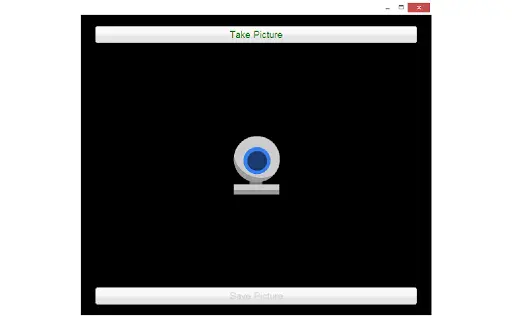
The user interface of the Webcam Snapshot Tool is intentionally minimal, focusing on a single button for capturing images. Navigation is straightforward, with no menus or complex panels, reducing the learning curve for new users. The workflow is optimized for speed: launch the app, wait for the webcam feed to initialize, and click to capture. This direct approach ensures that users can complete the task in under 10 seconds.
Performance observations are based on general software behavior patterns. The application runs with minimal impact on system resources, though exact CPU and RAM usage were not specified. Stability appears to be consistent, as the tool is designed to operate without interruptions during short sessions. The developer did not specify resource usage details, but the small file size suggests efficient coding practices. Users can expect a smooth experience on systems that meet basic desktop requirements, particularly on modern machines with integrated webcams.
Compatibility & System Requirements
The Webcam Snapshot Tool is compatible with both Windows and Mac operating systems, making it accessible to a broad user base. The software version is 1.0.0, released on May 15, 2024. It has a compact installation size of 5.8 MB, which contributes to fast download and setup times.
Exact system requirements were not listed. Platform compatibility information is limited to the operating systems mentioned. The developer did not provide additional system requirements. Users should ensure their device has a functioning webcam and sufficient permissions to access the camera. No additional hardware or software dependencies were indicated.
Pros and Cons
Pros
- Lightweight design with minimal system impact
- Simple, intuitive interface suitable for all skill levels
- Fast capture and save process with no delays
- Available for both Windows and Mac
- Completely free to use with no hidden costs
Cons
- No advanced editing or customization options
- Limited to basic snapshot functionality
- Exact system requirements not specified
- No built-in image preview or library management
- Dependent on external storage for file organization
FAQ Section
Is the Webcam Snapshot Tool compatible with my Windows or Mac device?
The application is designed for both Windows and Mac operating systems. Users should ensure their device has a working webcam and camera access permissions.
Is the software safe to download and use?
As a free desktop application with a small file size, the tool is considered secure when downloaded from official sources. It does not require administrator privileges or third-party drivers.
How often are updates released?
Version 1.0.0 was released on May 15, 2024. The developer has not provided information on future update schedules.
Does the tool require an internet connection?
No, the Webcam Snapshot Tool operates offline. It does not need an internet connection to capture or save images.
Can I use this tool on multiple devices?
Yes, since the software is free and does not require licensing, users can install it on multiple devices for personal use.
Final Thoughts + CTA
The Webcam Snapshot Tool delivers on its promise of simplicity and speed. While it lacks advanced features, it excels in its core function: capturing high-quality snapshots from a webcam with minimal effort. Its lightweight design, cross-platform availability, and zero cost make it a strong choice for users who need a no-nonsense solution. Professionals, students, and casual users alike will appreciate its efficiency and ease of use.
For those seeking a reliable, free tool to take quick webcam photos without the clutter of complex software, this application stands out. It’s particularly well-suited for quick profile updates, digital ID creation, or on-the-go visual documentation.
Download Webcam Snapshot Tool now







